
Brake light bulb, 5D
| Brake light bulb, 5D |
| To remove |
| 1. |
Remove the
rear light cluster, 5D
.
|
|
| 2. |
Remove the LED bulb kit for the brake light:
|
|
| • |
Remove the seal (A).

|
| • |
Remove the screws (B).
|
| • |
Remove the cover (C).
|
| • |
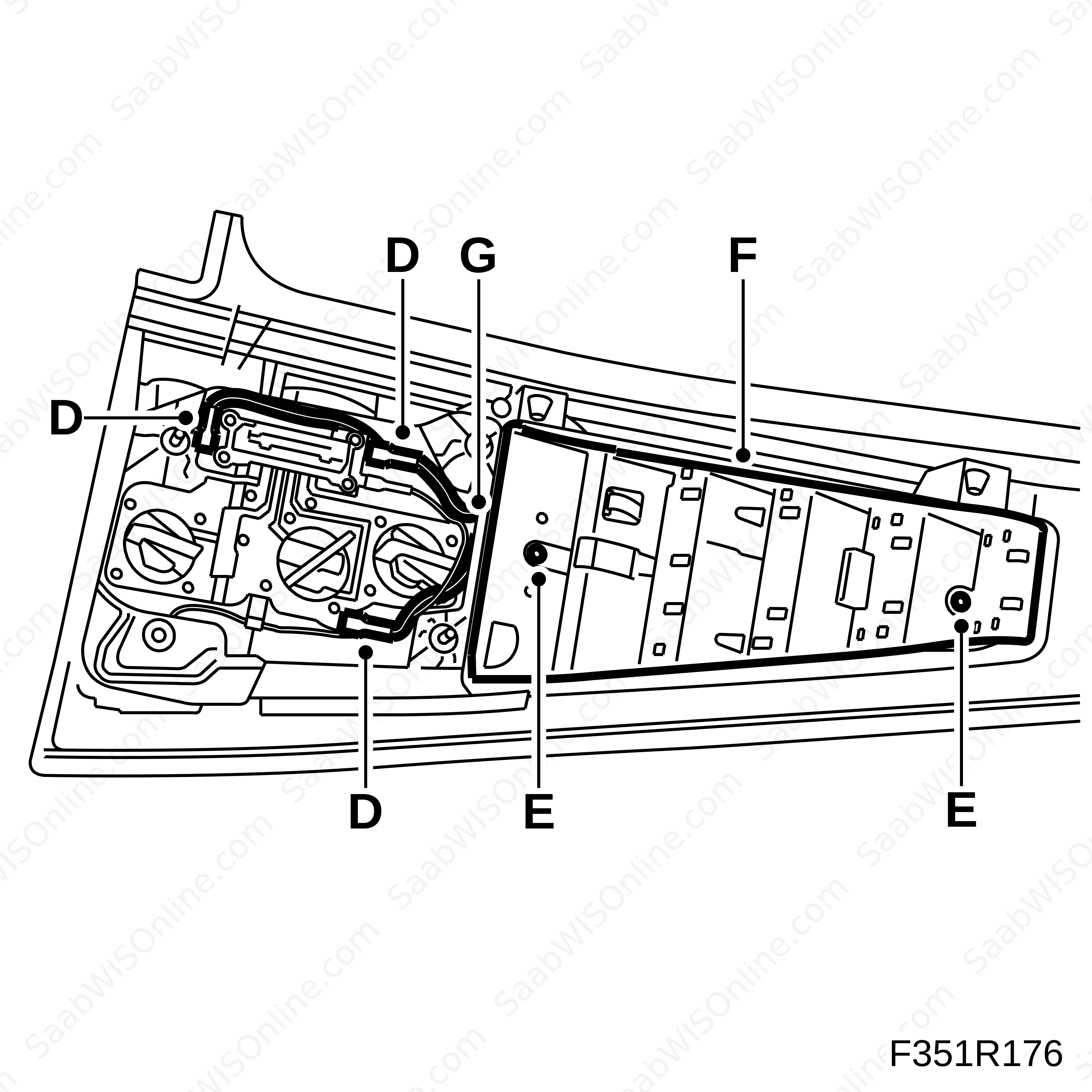
Remove the cable terminals (D).
|
| • |
Remove the screws (E).
|
| • |
Remove the LED bulb kit (F).
|
| • |
Pull the cables out through the hole (G) in the lamp housing.
|
| To fit |
| 1. |
Fit the LED bulb kit for the brake light:
|
|
| • |
Insert the cables through the hole (G) in the lamp housing.
|
| • |
Fit the LED bulb kit (F).
|
| • |
Fit the screws (E).
|
| • |
Fit the cable terminals (D).
|
| • |
Fit the cover (C).
|
| • |
Fit the screws (B).
|
| • |
Fit the seal (A).
|
| 2. |
Fit the
rear light cluster, 5D
.
|
|
This project is supported by memberships and donations. If you use this site, please consider Joining SCNA and/or making a donation.
Our Friends